1576
0
0
Win11 + WSL + WezTerm 打造 Warp 风半透明终端
文章摘要
|
日常开发的时候和终端打交道非常多,但是一直苦于没有好看的终端设置。前段时间接触了WezTerm这种现代终端模拟器,但是不会配置,终端看起来太老气。今天刷到warp终端,确实好看,但是可惜需要登陆账号+捆绑了一堆不需要的功能。
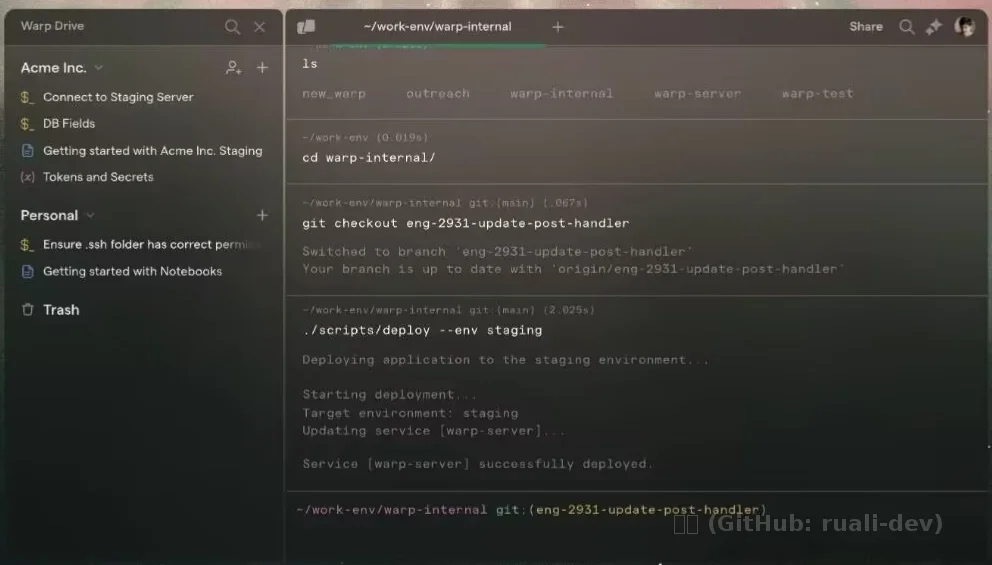
- warp图片参考
于是今天试试让Codex帮我写了下终端文件,一番操作下来确实美观不少。
效果:
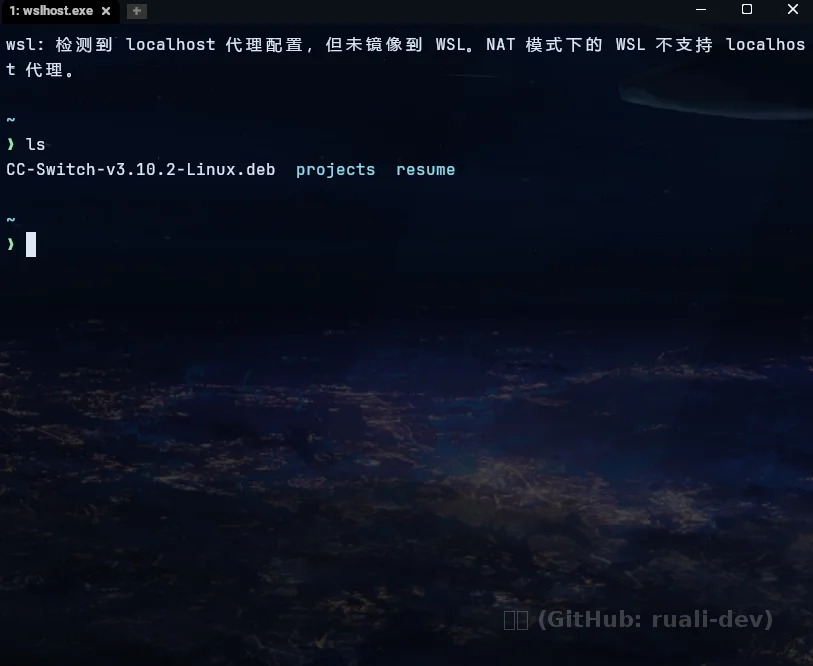
配置文件如下:
local wezterm = require 'wezterm'
local act = wezterm.action
local config = {}
local target = wezterm.target_triple or ''
local is_windows = target:find('windows') ~= nil
local is_linux = target:find('linux') ~= nil
local is_wsl = os.getenv('WSL_DISTRO_NAME') ~= nil or os.getenv('WSL_INTEROP') ~= nil

-- 使用 config_builder (如果版本支持) 提供更好的错误提示
if wezterm.config_builder then
  config = wezterm.config_builder()
end

-- 使用 WezTerm 默认鼠标行为(不强行接管右键)
config.disable_default_mouse_bindings = false

-- 平台默认启动行为
if is_windows then
  -- 在 Windows 上启动 WezTerm 时,默认进入系统 WSL
  config.default_prog = { 'wsl.exe', '-d', 'Ubuntu-22.04', '--cd', '~' }
elseif is_linux then
  -- 在 Linux/WSL 环境里直接进入登录 shell
  config.default_prog = { 'bash', '-l' }
end

-- config.skip_close_confirmation_for_processes_named = {
--   'bash', 'zsh', 'fish', 'sh',
--   'wsl.exe', 'wslhost.exe', 'conhost.exe',
--   'cmd.exe', 'pwsh.exe', 'powershell.exe',
--   'nu.exe', 'git-bash.exe',
-- }

-- 跨平台基础外观:Windows 上用 WebGpu,Linux/WSL 上优先 OpenGL 兼容性更好
if is_windows then
  config.front_end = 'WebGpu'
else
  config.front_end = 'OpenGL'
end

-- 清晰优先:主字体使用 Nerd Font Mono,并保留基础回退
config.font = wezterm.font_with_fallback {
  'JetBrains Mono',
  "Noto Sans Mono CJK SC",
  "Noto Color Emoji",
}
config.font_size = 12.0
config.line_height = 1.15
config.harfbuzz_features = { 'calt=0', 'clig=0', 'liga=0' }
config.enable_scroll_bar = false
config.use_fancy_tab_bar = true
config.hide_tab_bar_if_only_one_tab = false
-- 默认开窗尺寸设为更扁的长方形(宽一些,高度适中)
config.initial_cols = 100
config.initial_rows = 20
config.window_padding = {
  left = 10,
  right = 10,
  top = 10,
  bottom = 8,
}

-- 深色基调 + ANSI 调色板,统一 starship/ls 的视觉风格
config.colors = {
  foreground = '#dbe7f3',
  background = '#05080c',
  cursor_bg = '#dbe7f3',
  cursor_fg = '#070b10',
  cursor_border = '#dbe7f3',
  selection_bg = '#2a3a4b',
  selection_fg = '#eaf2ff',
  scrollbar_thumb = '#334556',
  split = '#2b3a49',
  ansi = {
    '#101923', '#cf5f6a', '#7dcf8a', '#e7c977',
    '#6f97ff', '#b993ff', '#69c8d5', '#cfd8e6',
  },
  brights = {
    '#1d2a39', '#ef7f8a', '#98e8a4', '#f4d98f',
    '#91b2ff', '#cbb1ff', '#8bdeea', '#e7eef8',
  },
}
config.window_background_opacity = 0.76
config.text_background_opacity = 1.0

-- 终端内背景图:通过 WEZTERM_BG_IMAGE 环境变量指定文件路径
-- Windows 示例:
-- setx WEZTERM_BG_IMAGE "C:\\Users\\<you>\\Pictures\\terminal-bg.jpg"
local bg_image = os.getenv 'WEZTERM_BG_IMAGE'
if bg_image and #bg_image > 0 then
  config.background = {
    {
      source = { File = bg_image },
      opacity = 0.22,
      hsb = {
        brightness = 0.22,
        saturation = 1.0,
      },
      horizontal_align = 'Center',
      vertical_align = 'Middle',
    },
    {
      source = { Color = '#05080c' },
      opacity = 0.30,
      width = '100%',
      height = '100%',
    },
  }
end

-- 平台差异化窗口设置
if is_windows then
  -- Acrylic 是磨砂模糊;清透玻璃感用 Disable
  config.win32_system_backdrop = 'Disable'
  -- 用 WezTerm 集成标题栏,避免系统白色标题框
  config.window_decorations = 'INTEGRATED_BUTTONS|RESIZE'
  config.window_frame = {
    active_titlebar_bg = '#0b1117',
    inactive_titlebar_bg = '#0b1117',
    active_titlebar_fg = '#dbe7f3',
    inactive_titlebar_fg = '#9fb0c4',
  }
elseif is_linux then
  -- Linux 下保留标题栏和边框,确保窗口控制按钮可见
  config.window_decorations = 'TITLE|RESIZE'
end

-- 在状态区标记当前运行环境,方便确认同一份配置是否命中预期平台
config.status_update_interval = 1000
wezterm.on('update-right-status', function(window, _pane)
  local tag = is_windows and 'WIN'
    or (is_wsl and 'WSL')
    or (is_linux and 'LINUX')
    or 'OTHER'
  window:set_right_status(wezterm.format({
    { Foreground = { Color = '#9fb0c4' } },
    { Text = ' ' .. tag .. ' ' },
  }))
end)

-- 启动时把窗口放到鼠标所在屏幕中央,避免总是出现在左上角
wezterm.on('gui-startup', function(cmd)
  local _, _, window = wezterm.mux.spawn_window(cmd or {})
  local gui_window = window:gui_window()
  local screens = wezterm.gui.screens()
  local screen = screens.active or screens.main
  local dims = gui_window:get_dimensions()

  local x = screen.x + math.floor((screen.width - dims.pixel_width) / 2)
  local y = screen.y + math.floor((screen.height - dims.pixel_height) / 2)
  gui_window:set_position(x, y)
end)

return config
我这个还能设置背景图片:
启用背景图方法(Windows):
setx WEZTERM_BG_IMAGE "C:\Users\<你的用户名>\Pictures\terminal-bg.jpg"
然后完全重启 WezTerm(不是只开新 tab)。
终端字体自然是经典的starship,抄了一个默认的社区作业:
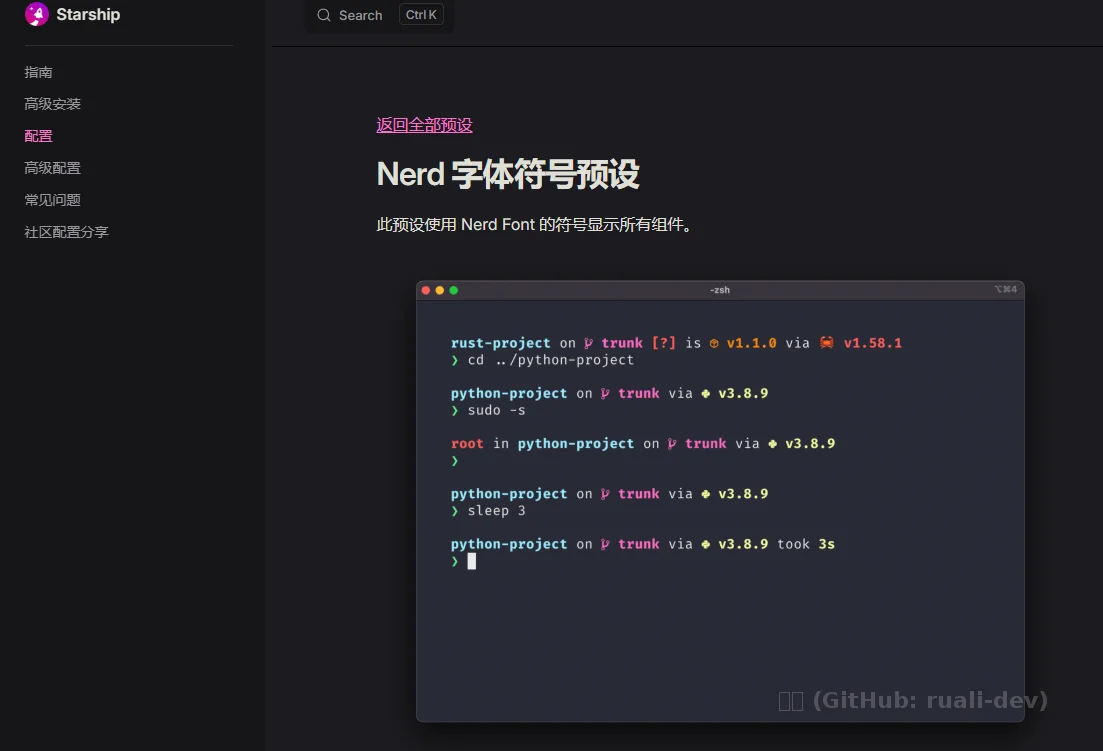
关于Nerd字体,我安装了JetBrainsMono Nerd Font Mono这个Nerd字体,Fira也不错,但是Fira有的符号修改的很特殊,看个人取舍了。
总结:好的终端设置确实能让人心情舒畅.
Win11 + WSL + WezTerm 打造 Warp 风半透明终端
/archives/wezterm-warp-style-terminal